Small Desk, Full Setup: What Actually Fits on 100cm
How to fit a real workspace onto a 100cm desk: riser height maths, what to mount instead of stand, wall storage, lighting without footprint, and the three things worth buying.

We may earn a commission if you buy through our links.
A 100cm desk holds more than most people think. The mistake is filling it edge to edge with flat objects, then discovering there is nowhere to put a notebook. The fix is not a bigger desk. It is moving things off the surface and into the space you already own: above the monitor, under the top, and against the wall.


Height before width
Before buying anything, sit down and measure the height of your eye line. Most small desks are 74cm tall, which puts a monitor on its own stand too low for anyone over about 175cm. A riser fixes both problems at once: it lifts the screen to eye level and turns the space underneath into storage. Look for 40mm of clearance at minimum, and check that the riser is no wider than the monitor, or it eats the surface you were trying to save.
The riser does the work
A riser with a shallow drawer is the single most useful object on a small desk. Keyboard and mouse slide under it at the end of the day, the drawer takes pens, cables and a card reader, and the top becomes a shelf for the things you actually look at. If your monitor is already on an arm, a low shelf across the back of the desk does the same job without adding height.
Mount what you can
Every object that stands on a base is using footprint you paid for. A clamp-on monitor arm removes the stand completely and lets the screen float over the back edge. A laptop stand with a vertical orientation takes the machine from 30cm of width to 8cm. A dock bolted under the desk means one cable comes up instead of five. These are the changes that make a small desk feel bigger, because they subtract rather than rearrange.
Keep the front 30cm clear
Treat the strip nearest your body as reserved. Keyboard, mouse, and nothing else. Anything that drifts into that zone gets pushed back within a week, so give it a permanent home further back: a pen cup at the rear corner, a tray for the wallet and keys, a hook for headphones on the side of the desk rather than the top.
Go up the wall
Wall space above the monitor is free real estate and almost nobody uses it. A single shelf at 40cm above the screen holds books, a plant and a speaker without touching the desk. A pegboard does the same for tools, controllers and cables. Both need one drill session and no further maintenance.
Light without footprint
A desk lamp with a base costs you a corner. A monitor light bar clamps to the screen, throws light onto the desk and not into your eyes, and uses no surface at all. On a small desk that difference is roughly a fifth of the usable area on the right side.
One cable route
Cable mess on a small desk is worse than on a large one because there is nowhere to hide it. An under-desk tray takes the power strip and the adapters, and a single velcro tie keeps the run to the wall tidy. Route everything before you put the desk back against the wall, not after.
What we would buy
Three things do most of the work: something to lift the screen, something to hold the cables, and something to light the surface.
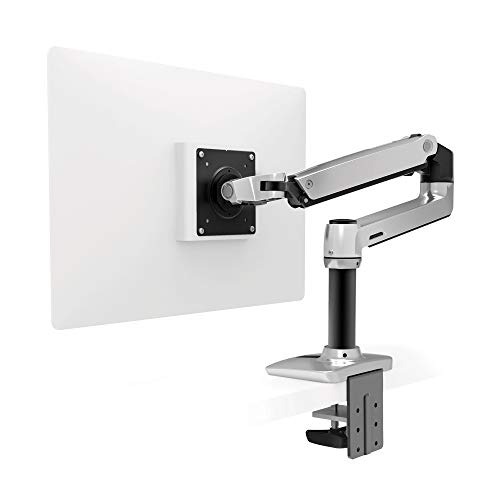
Ergotron LX Monitor Arm
Removes the monitor stand entirely and clamps to the back edge. Read our review


VIVO Under Desk Cable Tray
Screws underneath and takes the power strip out of sight. Read our review
Questions we get
Is a riser better than a monitor arm?
A riser adds storage and costs less. An arm frees the entire surface and moves the screen back, which suits shallow desks. If the desk is under 50cm deep, the arm wins; if it is 60cm and you need drawer space, the riser does.
How deep should a small desk be for a 27-inch monitor?
60cm is workable, 65cm is comfortable. Below 55cm the screen sits too close regardless of the mount, so either go to a 24-inch display or wall-mount and pull the desk out 5cm.
Does a light bar replace a desk lamp?
For working, yes. It lights the desk and the keyboard without glare on the screen. For reading paper documents it is less even, and a small clamp lamp is still worth having in a drawer.
We may earn a commission when you buy through links in this guide. Prices change; always check the current price.